1. RDBMS Administation
Duration1h15 AI AllowedPreparing the Docker environment
To guide you in the identification of the key elements that compose a Postgresql server, you will first install and run the service from a base Linux system.
- Run an alpine Linux container taking care that you map its 5432 port to the 5433 port of the host, and execute in interactive mode a shell terminal in it. Port mapping will be necessary later on.
- Use the
apkpackage manager to install thebashshell (more user-friendly thansh) and the last version of Postgresql (currently v17). Here is below an example of how to useapk:apk updateapk search postgresapk add postgresql17
Running the Postgresql server
For the moment, there is only one user registered in your Linux container, the root user. It is strongly recommended to run every service using a dedicated user to isolate the server’s process and data from other running services.
During the installation of the Postgresql pakage, a Linux user named postgres has been created. You will pay attention that the process running the server and the directory storing the data are owned by the postgres user.
Data cluster
Before running a server, the first step is to prepare the directory that will store the databases. This storage space is called a database cluster.
Start by creating the directory /usr/local/pgsql/data/ as root and then make it the property of user postgres and group postgres using the following command:
chown --recursive postgres:postgres /usr/local/pgsql/data/
Connected as user postgres, use the following command to initialize a cluster in the /usr/local/pgsql/data/ directory:
initdb -D /usr/local/pgsql/data
Check the content of the /usr/local/pgsql/data/ to especially identify the following elements:
postgresql.confthat contains the server parameterspg_hba.confdescribing connection rulesbasestoring the database, one in each directory named with the Object ID (OID) of the database.
DB server
You are now ready to start the server. Still as postgres run the following command:
postgres -D /usr/local/pgsql/data
During this command there is an attempt to create a file whose name indicate on which port the server is running. Fix the issue encountered by the previous command that was unable to create that file.
Then, retry to run the server and check the presence of this file.
Using the ps command, check the existence of several processes possessed by users postgres. There is the main so-called postmaster process, that waits for client connections, that has started the following sub-processess:
- checkpointer to perform periodic checks,
- background writer, to write cache instructions to the disk,
- walwriter to manage the cache,
- autovacuum launcher to avoid storage loss, update statistics, etc.
- logical replication launcher to manage data replication.
As an exercice, try to run a second server on the same host. Obviously, you will need to configure a new data cluster and avoir port conflict.
Client connection
From a shell ran in the postgresql container, try to establish a connection to your server(s) using the following command after having completed the options:
psql -h ... -p ... -U ... -l
The command lists all the available databases.
As a service, the goal is to make your database available through the network. To do so, you need to:
- have an access to the container from other machines on the network, this is done using port mapping. When you have ran the container you were supposed to declare this mapping (container:5432->host:5433). If it is not the case, go back to the beginning of the activity :-(
- configure the postgresql server to accept TCP/IP connection. Check the documentation to change the configuration and accept all TCP/IP connection. You will have to restart the postgresql service to activate your new configuration.
Ask your neighbour to connect to your database from his/her own alpine container. If you are not familiar with IP addresses and how to determine what is your host IP address, ask your teacher for some explanations.
Handling users and security access
Managing roles and their rights
In PostgreSQL, roles represent the fundamental entities used to manage authentication, permissions, and access control. A role can function as a user (able to log in) or as a group (used only to assign privileges to multiple users at once), or both. Roles allow administrators to structure security by granting privileges not directly to individual users but to shared roles that users inherit. Each role can own database objects, connect to databases, and perform operations depending on the rights it has been granted.
PostgreSQL rights (privileges) define what a role is allowed to do. These include basic capabilities such as LOGIN (ability to connect), CREATEDB (create databases), CREATEROLE (manage other roles), REPLICATION (perform replication tasks), and SUPERUSER (full unrestricted access).
Use the createuser command to create three roles with the following rights:
- role creator having the CREATEDB right but not the logging right,
- role logger having the LOGIN right.
Check that the rights are well applied trying to create a database with one user and to connect to it with the second one.
Managing data access
Object-level privileges include rights on tables, schemas, functions, and databases, such as SELECT, INSERT, UPDATE, DELETE, EXECUTE, or USAGE. Rights can be granted or revoked using the GRANT and REVOKE commands, and they can be inherited automatically if a user is a member of another role. Together, roles and privileges form the core of PostgreSQL’s robust and flexible security model.
- To experiment right management at the database and table level, create two roles (Alice and Bob) and with login capabilites using the two sql queries:
|
|
- Create a database owned by Alice
|
|
- Create a table and insert tuples into the rights_demo database
|
|
Now it is time to check what Bob can do.
- Try to connect to Alice’s rights_demo database to obtain the list of employees.
Let’s give some rights to Bob using the GRANT statement:
- Reconnect to the rights_demo database with Alice role.
- Grant read access on the table employees to Bob as follows:
|
|
Check that Bob can now list the employees and try to insert a new one.
Use Alice’s role to grant insert and update rights to Bob and check it works.
Finally, using Alice’s role, revoke all access on the table employees to Bob using the revoke command:
|
|
Handling the data
Backing up and restoring a database are two of the most critical tasks in database administration. A backup is a reliable copy of data and system state that allows you to recover information after accidental deletion, hardware failure, data corruption, or security incidents. Restoration is the process of rebuilding the database from this backup to return it to a functional state. Because databases evolve continuously, backup strategies must ensure data consistency, minimize downtime, and match the organization’s recovery requirements.
Logical backup
A logical backup is a save of the structure and content of a database so that it can be restored in another database.
At this time of the practice, you are supposed to have two instances of Postgresql running.
In one of them, create a test database using the following shell command and insert some data using the SQL script below:
createdb -h ... -p ... -U postgres testdb
|
|
Helped by the documentation on the pg_dump and pg_restore commands save the content of your testdb database into a binary file and restore this content in your second running server. You will have first to create a testdbck database.
Database replication
PostgreSQL replication is a mechanism that keeps one or more standby servers continuously synchronized with a primary database server, ensuring high availability, fault tolerance, and improved read scalability. PostgreSQL’s native replication is streaming replication, where the primary server sends its Write-Ahead Log (WAL) records to standby servers as they are generated. The standby replays these WAL records to stay nearly in real time with the primary.
To have a more realistic context of database server replication, run two postgresql servers on two different containers, one container called primarypg the second one called standbypg. The idea is to reproduce the following architecture:
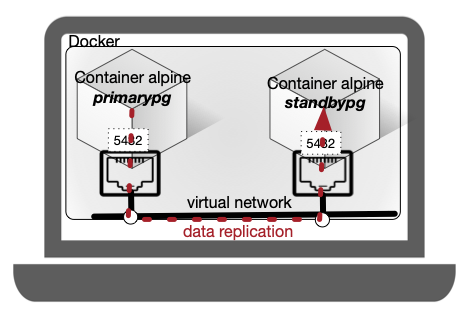
First step is to configure one of the two servers as a primary one. Here are some parameters to add to the configuration of the primary server.
|
|
It is now necessary to allow replication connections from the standby network (Docker internal network)
|
|
Still on the primary server, create a specific role named replicator with replication right. Connect to the postgres database and create the role using the following instruction.
|
|
From the standby server side now. Stop the second running instance of the postgresql server. Let PGDATAREP be the directory containing the data cluster of the standby server. Delete this cluster data repository first (rm -rf $PGDATAREP) and reconstruct a copy of the primary data cluster in PGDATAREP using the following command:
|
|
Options of this previous command have the following meaning:
- -U replicator uses the replication role we created.
- -D is the destination data directory.
- -Fp plain format (file copy).
- -Xs fetches required WAL files with streaming.
- -P shows progress.
- -R writes the primary_conninfo and creates standby.signal so PostgreSQL will start in standby mode.
- Restart the standby server and check that it contains the same data as the primary one.
- Insert new tuples in the primary server.
- Check that the new tuples are replicated in the standby server.
In case of failure of the primary server, the standby server can take the lead. To do so, it has to be turned from a replicated mode to a promoted mode by executing the following query:
|
|