4. SPARQL query Language
Definition
SPARQL is a query language and protocol that allows to search, add, modify or delete RDF data. Its name is a recursive acronym that stands for SPARQL Protocol And RDF Query Language.
4.1 Introduction
A SPARQL query is the expression of an RDF graph in which some nodes or properties are not URIs or values, but variables. Finding one or more solutions to a query consists of finding a subgraph in the database graph whose topology, URIs, and values correspond to those of the query. The solution(s) are the URIs or values that the variables must take for the match to be established. SPARQL is based on the Turtle syntax.
To illustrate this point, we can examine the following RDF graph. This graph expresses that: ‘Jules Verne is the author of the books Twenty Thousand Leagues Under the Sea and Around the World in Eighty Days.’
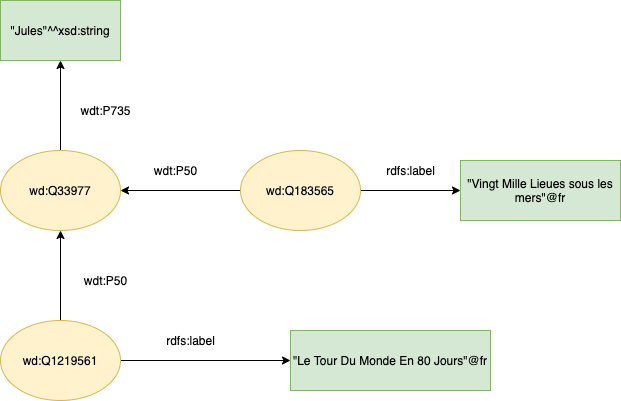
We can then ask the question: Which books were written by Jules Verne? This question can be formulated using a SPARQL query, which will be expressed by the following RDF graph:
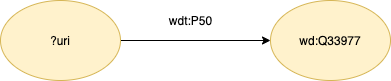
Note that in this graph, the node ?uri represents the variable on which this query is performed. This query can be expressed in SPARQL syntax as follow :
|
|
-
You can test this query in Wikidata’s Query Service: https://query.wikidata.org/
-
Observe the result of the query. At the bottom of the page, in the search bar, you can enter the two resources
wd:Q183565(Twenty Thousand Leagues Under the Sea) andwd:Q1219561(Around the World in 80 Days) to verify that they are part of the query result. -
Now we want to display the titles of the works in addition to the URIs:
|
|
This query can be simplified as follows:
|
|
The documentation for the Sparql 1.1 language is available at this link: https://www.w3.org/TR/sparql11-update/
4.2 Operators and functions
In this section, we will learn the syntax of the SPARQL language including useful keywords and functions for querying RDF triples.
Operators
Here are some useful syntax elements for formulating SPARQL queries:
- Logical operators:
&&for ‘and’||for ‘or’!for negation.
- Comparison operators:
<, >, <= , >= - Arithmetic operators:
+ , -, * , /
Some basic functions
- Apply a filter to a result returned by the query:
FILTER(condition) - Some useful functions:
STR (): converts an entity to a string.BOUND(): checks whether a value has been associated with a given variable as a parameter.LANG(): obtains the language of a given variable as a parameter.LANGMATCHES(): used withLANG(), compares the result returned byLANG()with the language specified as the second parameter.
Test the following examples in the Wikidata query service:
- Filter the results to display only the titles of works listed in French in the Wikidata database.
|
|
- We keep the same filter, specifying beforehand that we only want to display literary works.
|
|
4.3 Property paths
A Property path allows for more concise expression of some SPARQL basic graph patterns. It allows to search for resources that are linked by a path of variable length, and not just by a single property (i.e. path length 1).
- Example: We modify the previous query to display the name of the publisher of each book when the publisher is known. To do this, we create a property path using an intermediate variable (which we can choose to display or not).
|
|
The property path can also be expressed without intermediate variables as follows:
|
|
Operators in a property path
A property path can be expressed by associating operators with properties. Sometimes there is a chaining associated with a given property. For example, a property may appear several times in the same path. This can be expressed using the operator (+) associated with that property.
Let us take the example of the administrative location (wdt:P131) between a city and its region in the Wikidata database. There may be several administrative inclusion links between a city and its region. For example, the municipality of Tréguier (wd:Q235297) is located in the department of Côtes-d’Armor (wd:Q3349), which is in turn located in the Brittany Region (wd:Q12130). We therefore have the following triples:
wd:Q235297 wdt:P131 wd:Q3349 and wd:Q3349 wdt:P131 wd:Q12130
This can be expressed as: wd:Q235297 wdt:P131+ wd:Q12130.
wdt:P131+ means that the property wdt:P131 is present multiple times in the property path.
We could also have used the operators ? or * instead of +. But be careful, these operators do not all mean the same thing. Here is what they mean more precisely:
?: the property is present as an option in the property path without repetition.+: the property must be present and may appear multiple times in the property path (repetition).*: the property may be present and, if so, may appear multiple times (repetition).
We want to display all the names and birthplaces of writers who were born in the Brittany region. Test the following query with each of the three operators ?, + and * to see the different results returned.
|
|
There are other operators, for example the | operator allows to express a choice of property (an alternative).
- Example: In addition to the names and places of birth of writers from Brittany, we now want to display the organisations or sports clubs of which they are members (wdt:P463). Membership of a sports team is designated by the property wdt:P54.
|
|
The order of precedence among operators is as follows:
*,?,+,/,|
4.4 SPARQL statements
VALUES
The VALUES statement is used to list all the values that a variable can take. It is written as follows:
VALUES (?variable){(valeur1) (valeur2) (...)}, which is equivalent to :
|
|
- Example : We want to display Jules Venrne’s works that are defined as litterary works or specific versions:
|
|
OPTIONAL
The OPTIONAL keyword is used at the end of a query to specify triples that allow certain results to be displayed optionally (they are not mandatory as display results). This is useful when the properties searched for by the query exist in the database for only some entities, but not for all entities returned. This is expressed as follows:
OPTIONAL { list of triples }
-
Example: we want to modify our previous query to also display the publisher (
wdt:P123) of each work. As this property is not entered in the database for all works, we specify it as optional in the query. -
Test this query with or without the OPTIONAL keyword:
|
|
ORDER BY
The ORDER BY statement allows to sort results according to an order relationship.
- Example: We repeat the previous query, displaying the names and places of birth of Breton writers, sorted by their names.
|
|
GROUP BY
By default, a set of query results consists of a group of results. GROUP BY allows you to partition the result into several groups, to which you can apply an aggregate function.
- The sparql 1.1 aggregate functions are:
count,sum,min,max,avg,… - Results can be sorted in descending order (
DESC) or ascending order (ASC).
Let us return to the previous example to sort the results according to the number of writers in descending order.
|
|
The use of Group By in Sparql is similar to that in sql.
HAVING
HAVING allows to apply a condition to a set of results to be displayed. Let’s use the previous example to display only cities with at least 10 writers.
|
|
LIMIT and OFFSET
limit: allows to limit the size of the sequence of results to be displayed.offset: allows to specify the rank in the sequence of results from which display should begin.
Let’s return to our example to limit the number of results returned to 10 using the LIMIT statement and specify that we want to display results from rank 5 onwards using the OFFSET statement.
|
|
UNION
The UNION statement displays the union between two sets of triples.
Let’s take the example of Breton writers who are members of an organization or sports club.
|
|
ASK
Using ASK instead of SELECT allows to check for the presence of a subgraph in an RDF graph. It returns the value (true or false)
Example: check whether the writer “Alain Robbe-Grillet” was born in Brittany?
|
|
CONSTRUCT
CONSTRUCT instead of SELECT returns a list of RDF triples instead of a list of values.
BIND
The BIND statement allows to assign a calculated value to a variable. This calculated value does not come directly from the database.
IRI
The IRI statement allows to transform a string of characters into a URI, more precisely an IRI (International Resource Identifier);
Example
Let’s look at an example of how these functions are used with DBpedia triples (http://dbpedia.org/). We want to display the Wikidata triples that return the names and dates of birth of writers, constructing them in a way that is compatible with the DBpedia schema.
|
|
There are additional statements for modifying the content of an RDF database.
- Data can be added with
INSERT- Data can be deleted with
DELETE- Data can be replaced …
- All documentation is available here: https://www.w3.org/TR/2013/REC-sparql11-update-20130321/#graphUpdate