1. Introduction
Definition
The Semantic Web enables machines to understand the semantics and meaning of information on the Web. It extends the network of hyperlinks between traditional web pages with a network of links between structured data, enabling automated agents to access different data sources on the web more intelligently and thus perform tasks (search, learning, etc.) more accurately for users.
The term semantic web was coined by Tim Berners-Lee, co-inventor of the web and director of the W3C, which oversees the development of proposals for semantic web standards.
1.1 Semantic Web
The Semantic Web arrived with Web 3.0, which marks a transition from the document-based Web to the Semantic Web. Before Web 3.0, users accessed the Web with simple queries, but it was up to them to manipulate the information to suit their needs. The web was reserved for humans, as machines were unable to replace them effectively.
The semantic web allows machines to analyse the web in order to understand it, thereby enabling them to respond to more complex queries posed by humans.
1.1.1 The Google search engine example
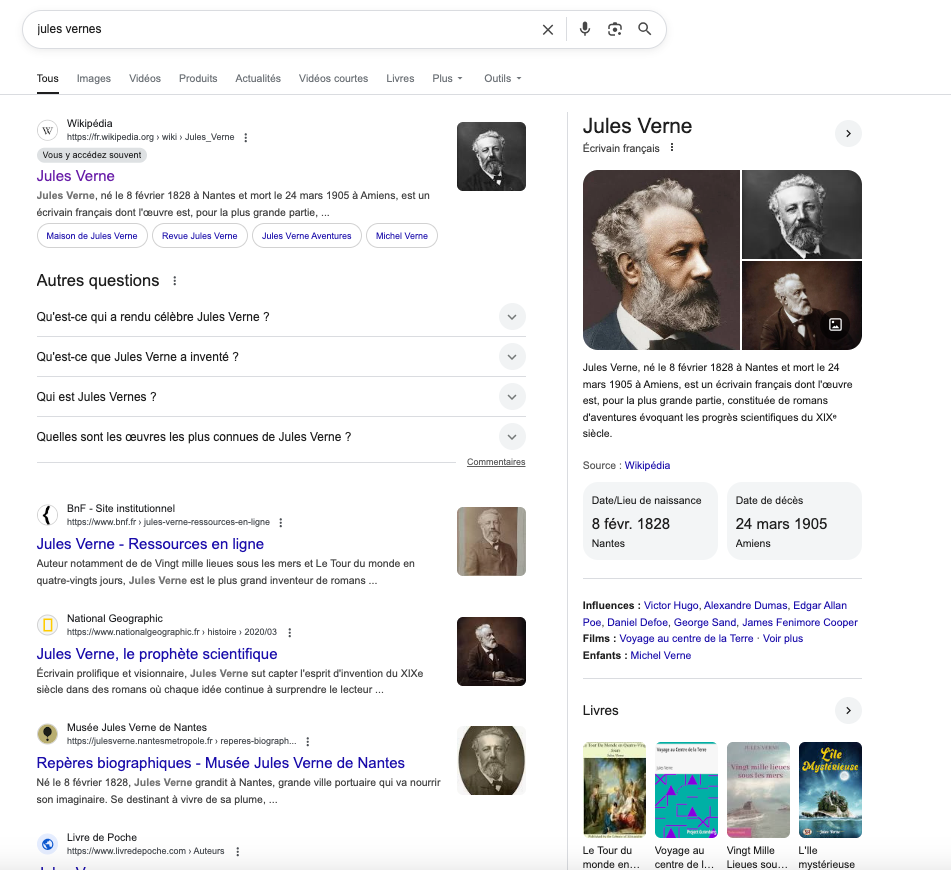
Let’s say we want to write a biography of Jules Verne. To this end, we would theoretically have to search the web for information, connect the diverse information and coordinate it chronologically. Since 2012, the Google search engine has been doing this for us thanks to its knowledge graph.
Google performs a semantic search, which consists of determining the exact meaning of the search query. This is possible thanks to a database listing several hundred million real-world objects such as personalities, places, etc. The engine is able to associate these elements, for example by finding the president of a particular country or the author of a particular book. It is thus able to answer specific and complex questions asked by humans.
- Look at the information returned by the Google search engine when you enter Jules Vern. In addition to a set of relevant links about the writer Jules Verne, the engine has listed several pieces of structured information about the author, which are displayed to the right of the search results (Biography, Date/Place of birth, Date of death, Period of activity, Films, Children, Books).
-
In this example, all information concerning Jules Verne is automatically aggregated and made understandable by machines.
-
We can see that Google distinguishes between Jules Verne as a novelist or writer and the various places named after Jules Verne (e.g. Jules Verne Museum, Jules Verne Public School, Jules Verne Hall, Jules Verne Vocational High School, etc.).
-
This allows for more complex queries. For example:
who wrote Twenty Thousand Leagues Under the Sea
1.1.2 The knowledge graph of Google search engine
The knowledge graph used by the Google search engine allows you to search for things, people or places that Google knows about - celebrities, cities, sports teams, buildings, geographical features, films, works of art, etc. — and instantly obtain information related to the query that has been entered.
This knowledge graph is based on public databases such as Wikidata, but it is also enriched on a larger scale to focus on the breadth and depth of information. It contains more than 500 million objects, as well as more than 3.5 billion relationships between these different objects. It also adapts based on users’ searches.
This knowledge graph improves Google search in three different ways:
-
Finding the right thing being searched for: a query can be ambiguous. Do we mean Jules Verne the writer, Jules Verne the museum, or Jules Verne the restaurant? Google will distinguish between these things (entities) and display relevant links to them.
-
Displaying a summary of relevant information: thanks to the knowledge graph, Google can better understand the user’s query, allowing it to summarise relevant content on the subject, including key facts that the user is likely to need for that particular topic. To this end :
- To find out which facts are most likely to interest a user for each thing, Google aggregates all user queries on that thing.
- All the relationships between things are modelled in this graph, so that information related to each thing can be found.
-
Deepening and broadening the search: the knowledge graph allows users to discover new facts or links that prompt them to launch a new search.
1.2 Data and metadata
1.2.1 Data
Let’s consider the following definitions to understand the meaning of data.
-
Data: a sequence of symbols or characters. E.g., the character sequences
Jules,VernorJules Verne. -
Information: data or a sequence of related data that can be interpreted. E.g., the data
Jules Verncan be interpreted as a person’s name,1870is a year,Twenty Thousand Leagues Under the Seais the title of a book. This data can be linked to obtain the informationJules Verne wrote the book Twenty Thousand Leagues Under the Sea in 1870. -
A data type: syntax and semantics that data of this type must comply with. E.g., integers, character strings, dates, days, etc.
-
Knowledge: comes from one or more pieces of information that allow new information to be deduced. E.g, if we know:
a. A personality, author of a book, is a writer,
b. “Twenty Thousand Leagues Under the Sea” is the title of a book,
c. “Jules Verne” is the name of a personnality.
Then the information “Jules Verne wrote Twenty Thousand Leagues Under the Sea in 1870” allows us to deduce that “Jules Verne is a writer”.
1.2.2 Metadata
To overcome interpretation difficulties, the data to be interpreted must be labelled using other data, called metadata.
E.g., Jules Verne is the name of a person. We have associated the metadata name with the data Jules Verne. name is the identifier for this metadata.
When creating metadata, we must:
- Identify what we want to describe (e.g., does ‘name’ represent the person’s first name and last name or only the last name?).
- Designate the metadata: assign to it a linguistically neutral identifier.
- Add a definition.
- Indicate its arity: it can be fixed, for example 1 value, a finite or infinite interval, etc.
- Define the type of data that can be referenced by this metadata.
1.2.3 Metadata schemas
- A metadata schema is a collection of metadata describing one or more types of entities.
- An entity can be concrete or physical (e.g., name, as it describes a person), conceptual (e.g., title, as it describes a book) or abstract (e.g., Twenty Thousand Leagues Under the Sea, as it describes the title of Jules Verne’s book).
- On the web, metadata is used to describe all or part of a document. Example: schema.org (https://schema.org/). Allows HTML pages to be structured. Interpreted by social network applications such as Facebook.
- Metadata can be external to the document. It is grouped into XML files and stored in warehouses. This has the advantages of not adding weight to documents and reducing download time.
An application profile is a new schema obtained for a particular application by adapting and combining existing schemas, while maintaining interoperability with the basic schemas.