2. Advanced Docker notions
Duration1h AI Banned
This second practical activity introduces the notions of Dockerfile and Docker compose, two strategies to script the deployment of Docker architecture.
Dockerfile
A Dockerfile is simply a text file containing a sequence of instructions to build a personalized image. Each line of the Dockerfile starts with a command possibly followed with arguments.
A Dockerfile is thus a recipe detailing the different layers of your final image. It starts with a FROM command indicating which base layer to start with.
Run in a directory containing a Dockerfile, the following build command creates an image called myimg :
docker build -t myimg .
Containers can then be started from this image.
Create a Dockerfile respecting the following requirements:
- start with the official and latest Postgresql image,
- expose the default 5432 port,
- set three environment variables
|
|
- a database named
testdbhas to be created on container start. This database should be initialized using the following sql script.
|
|
The image creation process can be run using the following command:
|
|
In case of success, you shall find an image called my-postgres-image in your local Docker registry.
You can test your Dockerfile using the following command that also mounts a volume to the directory where postgresql stores data
|
|
Using the docker exec command or from the Docker dashboard, open a terminal to test the connexion to the test database using the psql client:
|
|
If the connexion is established, execute the following query:
|
|
Docker compose
Docker Compose is a tool that lets you define and run multi-container Docker applications using a single configuration file, usually named docker-compose.yml. Instead of starting each container manually with long docker run commands, Docker Compose allows you to describe your entire environment — services, networks, and volumes — in a clear, declarative format. With a single command (docker compose up), Compose builds images if needed, creates containers, connects them together, sets environment variables, maps ports, and manages persistent storage.
In this exercice you will create a Compose file that run two containers, a postgresql server and a web server providing an access to pgadmin.
Write a Compose file that makes it possible to deploy the following architecture.
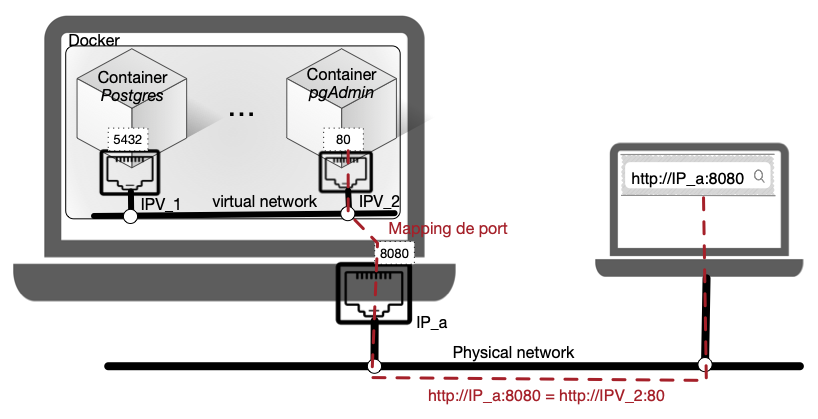
Here is a list of the requirements:
- run a postgresql container using the image created during the previous example,
- run a pgadmin container mapping its port 80 to the port 8080 of the host,
- the two containers are located in a virtual network called
myvirtnet, - the data of the postgresql server are stored in a volume named
pgdata.
Some good practices
Here are some good practices when using Dockerfiles and Compose:
- Always use user-defined networks
- Use service names, never hardcoded IPs
- Avoid exposing DB ports when not needed
- Document networks in Compose file
- Use named volumes for DBs, caches, stateful services
- Declare volumes explicitly in Compose