4. MLOps Introduction
Duration2h30 AI Banned
Introduction
This practical session introduces MLflow for systematic experiment tracking and model management in machine learning pipelines. You’ll learn to transform your structured air quality pipeline into a fully tracked and reproducible ML workflow that follows industry best practices for experiment management.
Through this hands-on workshop, you will master essential MLOps skills:
- Experiment Tracking: Systematically log parameters, metrics, and artifacts for all ML experiments
- Model Management: Version and organize trained models with metadata and lineage tracking
- Reproducibility: Ensure experiments can be reproduced and compared reliably
- Collaboration: Share experiment results and models across team members
- Production Readiness: Prepare models for deployment with proper versioning and metadata
MLflow is the industry standard for ML experiment tracking, used by companies like Databricks, Netflix, and many organizations to manage their ML lifecycles. Learning MLflow prepares you for real-world ML engineering roles where experiment tracking and model management are critical.
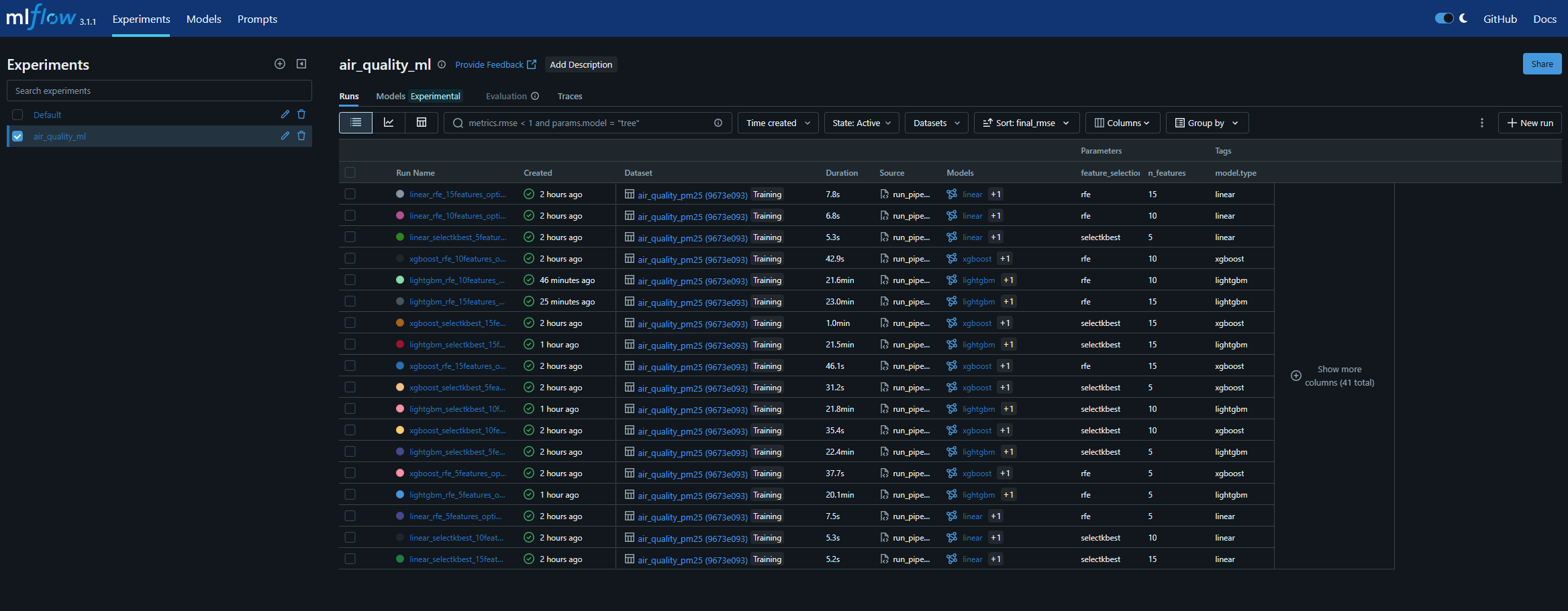
By the end of this workshop, you will have a complete MLflow interface that allows you to visualize, compare, and manage all your machine learning experiments in a professional manner:
Prerequisites
Before starting this activity, ensure you have completed:
- Environment Setup - Python environment with required packages
- Structured ML Pipeline - Complete pipeline implementation
- Hyperparameter Optimization - Extended pipeline with optimization
This activity assumes you have a working structured pipeline with all components (DataProcessor, FeatureEngineer, ModelTrainer, Evaluator) fully implemented and tested.
Understanding MLflow Architecture
MLflow provides four main components for ML lifecycle management:
MLflow Components:
├── 📊 Tracking: Log parameters, metrics, artifacts
├── 📦 Projects: Package ML code in reproducible format
├── 🏪 Models: Deploy models to various platforms
└── 🗃️ Registry: Centralized model store with versioning
Key Concepts
- Experiment: A collection of related runs (e.g.,
air_quality_ml) - Run: A single execution of ML code with logged parameters, metrics, and artifacts
- Parameters: Input configurations (
model_type,n_features,learning_rate) - Metrics: Numeric values that change during training (
rmse,r2,accuracy) - Artifacts: Files associated with runs (
models,plots,datasets) - Tags: Key-value pairs for organizing and filtering runs
- Model Registry: Central repository for managing model versions and stages
Integration Benefits
- 🔬 Scientific Rigor: Track all experiments systematically
- 📈 Performance Comparison: Compare models and configurations easily
- 🔄 Reproducibility: Recreate any experiment exactly
- 👥 Team Collaboration: Share results and models across team
- 🚀 Production Deployment: Seamless model deployment pipeline
Getting Started
MLflow Installation and Setup
First, install mlflow 3.1.1 in a mlops group and check installation:
|
|
Understanding MLflow UI
MLflow provides a web interface for browsing experiments:
|
|
Key UI Components:
- Experiments List: All your ML experiments organized by name
- Runs Table: Individual runs with parameters, metrics, and metadata
- Run Details: Complete information about a specific run including artifacts
- Compare Runs: Side-by-side comparison of multiple runs with charts
- Model Registry: Centralized model management with versioning
Project Structure with MLflow
Your existing project structure will be extended with MLflow tracking:
air_quality/
├── src/
│   ├── pipeline/           # ✅ Your existing pipeline
│   └── utils/
│       └── config.py       # 🔧 Add MLflow configuration
├── mlruns/                 # 🆕 Local MLflow tracking data
│   ├── 0/                  # Default experiment
│   └── <experiment_id>/    # Your experiments
└── scripts/
    └── run_pipeline.py     # 🔧 Extended with --mlflow flag
Implementation Guide
You will extend your existing pipeline to include comprehensive MLflow tracking by completing TODO sections across multiple files. The integration is designed to be completely optional - your pipeline will work exactly as before, with MLflow providing additional tracking when enabled.
Phase 1: Core MLflow Configuration
Step 1: Configure MLflow Settings
Purpose: Add MLflow configuration constants to centralize tracking settings.
File: src/utils/config.py
Info
Before implementing: Review the existing configuration structure in config.py. Notice how configuration is organized by sections (DATA, PREPROCESSING, MODEL, etc.). You’ll add a new MLflow section following the same pattern.
|
|
Details
Action Required: Set up the MLflow configuration parameters to enable experiment tracking with appropriate naming and storage settings.
Reference: MLflow Tracking Configuration
Phase 2: Pipeline Component Integration
Step 2: Add Tracking to Model Training
Purpose: Log model training parameters, metrics, and artifacts to MLflow.
File: src/pipeline/model_trainer.py
Info
MLflow Pattern: Always check if mlflow.active_run(): before logging. This ensures your code works with or without MLflow tracking enabled.
Method: train_single_model()
Complete these TODO sections:
- Import MLflow (at the top of the file with other imports)
|
|
- Log Training Parameters (after model creation, before training)
|
|
Tip
Hint: Use mlflow.log_params() with a dictionary. The **model_params syntax unpacks keyword arguments into the dictionary.
Example structure:
|
|
Details
Action Required: Integrate MLflow tracking into the model training process to automatically log parameters, hyperparameters, and training configuration.
Reference: mlflow.log_params()
Step 3: Add Tracking to Cross-Validation
Purpose: Track cross-validation strategy and performance metrics in MLflow.
File: src/pipeline/evaluator.py
Warning
Critical MLflow Distinction:
mlflow.log_metrics(): Only accepts numeric values (int, float)mlflow.log_params(): Accepts strings and other types Mixing them causes: “Invalid value for parameter ‘metrics[X].value’ supplied”
Method: cross_validate_model()
Complete these TODO sections:
- Import MLflow (at the top of the file)
|
|
- Log Cross-Validation Results (after calculating cv_results)
|
|
Implementation Guidance:
- Create a
cv_metricsdictionary for numeric values only - Prefix metric names with ‘cv_’ for clarity (e.g., ‘cv_rmse_mean’)
- Add metadata like fold count and sample size
- Log the CV strategy as a parameter (not metric)
Details
Action Required: Implement MLflow tracking for cross-validation to capture performance metrics, validation strategy, and associated metadata.
References:
Step 4: Add Feature Selection Tracking
Purpose: Log feature selection method, parameters, and results to MLflow.
File: src/pipeline/feature_engineer.py
Method: select_best_features()
Complete these TODO sections:
- Import MLflow (at the top of the file)
|
|
- Log Feature Selection Parameters (before performing selection)
|
|
What to Log:
- Selection method (selectkbest, rfe)
- Total features available before selection
- Number of features to select
- Target column name
Details
Action Required: Add MLflow tracking to the feature selection process to log selection methods, configuration parameters, and resulting feature sets.
Reference: MLflow Parameter Limits
Phase 3: Pipeline Orchestration
Step 5: Add MLflow to Main Pipeline
Purpose: Integrate MLflow tracking into the main pipeline execution with proper lifecycle management.
File: scripts/run_pipeline.py
This is the most complex integration, requiring updates in multiple locations:
- Add MLflow imports (at the top with other imports)
|
|
- Add –mlflow argument (in
parse_arguments())
|
|
- Setup and Start MLflow Run (at the beginning of
run_pipeline())
|
|
- Log Dataset Information (after data loading)
|
|
- Log Model and Results (after cross-validation)
|
|
- Save and register Model
|
|
- Add final result and pipeline execution time
|
|
- End MLflow Run (in finally block)
|
|
Details
Action Required: Orchestrate the complete MLflow integration across the entire pipeline including run management, dataset logging, model artifacts, and proper lifecycle handling.
References:
Testing and Validation
Test your MLflow integration incrementally:
- Test Basic Tracking:
|
|
- Test Model Comparison:
|
|
Conclusion
This workshop has introduced you to MLflow, the industry standard for ML experiment tracking and model management. By completing this implementation, you have gained practical experience with:
- Systematic Experiment Tracking: Logging parameters, metrics, and artifacts consistently
- Model Management: Versioning and organizing trained models with proper metadata
- Reproducible Research: Ensuring experiments can be recreated and verified
- Team Collaboration: Sharing experiment results and models effectively
- Production Readiness: Preparing models for deployment with comprehensive tracking
The MLflow integration you’ve implemented provides a foundation for professional ML development, where transparency, reproducibility, and systematic experimentation are essential.